
Subframe Review, Pricing & Alternatives (2026)
Design web interfaces on a canvas connected to your codebase and coding agent.
Last updated: October 26, 2026
What is Subframe?
Subframe combines a visual web design canvas, live browser preview and coding agents for teams building product interfaces. It supports HTML and CSS, with first-class React and Tailwind support, and connects to Claude Code or Codex. The Free plan includes one project; Pro starts at $20 per editor monthly for unlimited projects and more AI credits.
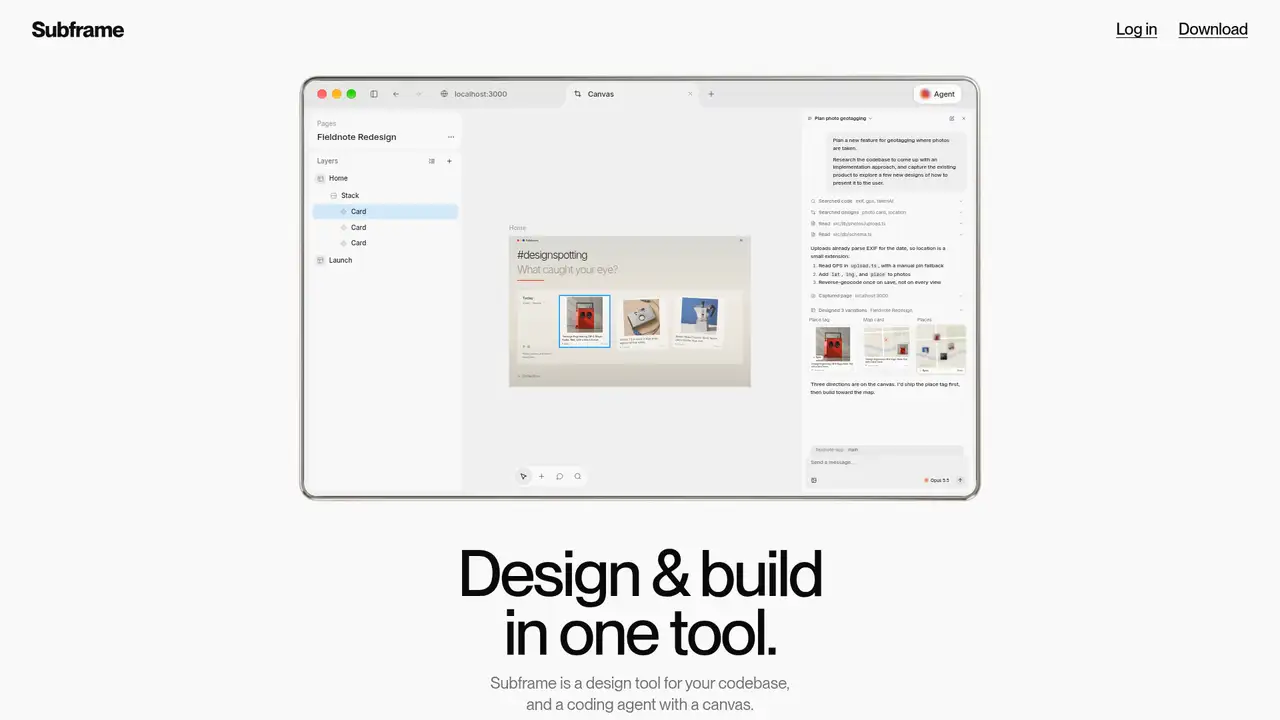
Subframe puts a web design canvas, a browser and a coding agent in the same workspace. Atomic Design Inc operates the product, which opened to everyone in April 2024 after two years in beta. CEO Irvin Zhan describes starting it in 2022 to reduce the work of translating interface mockups into CSS. Its public launch announcement claimed thousands of builders, a company-reported figure rather than a current user count. The product now centers on working with an existing codebase instead of treating a mockup as a separate deliverable. Its practical appeal is the connection between interface decisions and implementation: components, design tokens and code can inform the design rather than being reconstructed after approval.
A typical workflow starts with an existing local codebase or a design on the canvas. Import a theme and paste component source code, then let the agent recreate components for visual editing. Use the browser to preview the running application, adjust its interface and capture it as an editable design. Claude Code or Codex can work across the design, browser and repository, while external agents connect through MCP. The desktop application supports local development on macOS and Windows; the web application shares the canvas and projects. There are still boundaries between design and application behavior. Subframe’s FAQ says exported pages often need refactoring and additional business logic, so a finished-looking screen should not be mistaken for a finished application.
HTML and CSS underpin the canvas, with first-class React and Tailwind support when those technologies are in the project. Subframe integrates Claude Code and Codex rather than requiring every task to run through one fixed model. Users can connect those subscriptions or spend Subframe AI credits in Agent chat. Its October 2026 releases expanded the connection between design and development: Windows desktop support and agent-controlled browser interaction arrived on October 16, image uploads over MCP on October 20, and project management over MCP on October 21. On October 22, connected agents gained access to their MCP servers, skills, plugins and project instruction files. The same release introduced a separate open-source library of React animations, Motion components and WebGL shaders.
Free costs $0 and includes one project, unlimited pages, prototypes and team members, one theme and 24-hour version history. Pro costs $20 per editor monthly, adds unlimited projects and themes, extends history to seven days and advertises six times the Free plan’s AI credits. Billing includes Admins and Editors; Viewers remain free. Custom adds a negotiated credit allocation, at least 30 days of history and Slack support. Every new team receives 3,000 shared welcome credits that do not expire, while seat allocations reset each billing period. Budget separately for connected Claude or Codex subscriptions. External agents can still consume Subframe credits when MCP tools generate designs, and higher seat tiers increase credit allocations and charges.
Figma imports are a reconstruction workflow: export a page as a PNG and ask Subframe to recreate it, rather than expect an editable file transfer. Bulk component import through the CLI is restricted to selected teams, and exported pages still need application logic. In Subframe’s own comparison, Figma emphasizes collaborative design and engineering handoff, Paper offers an HTML/CSS canvas for exploration, and Pencil places design inside an IDE. Those distinctions are more useful than treating every AI interface generator as interchangeable. Subframe’s emphasis is connecting design decisions to components and coding agents, with cloud-hosted designs even when the repository stays local. Pick it if your team wants a shared web-interface canvas connected to an existing codebase and agent workflow.
Who is Subframe best for?
- React and Tailwind teams can design with the same web primitives used in their application.
- Teams using Claude Code or Codex can bring their existing subscriptions into the design workspace.
- Product teams can share one project with unlimited members on the Free plan.
- Developers can preview a local application and edit its interface visually in the desktop app.
Subframe Pricing (2026)
Pricing model: Freemium. All prices in USD.
| Plan | Price | What you get |
|---|---|---|
| Free | $0/month | One project, unlimited pages, prototypes and members, one theme, 24-hour version history and limited AI credits. |
| Pro | $20/editor/month | Unlimited projects and themes, seven-day version history and six times the Free plan’s AI credits. Admins and Editors are billed; Viewers are free. |
| Custom | Custom | Unlimited projects and themes, custom AI credit allocation, 30 or more days of version history and Slack support. |
Pros and Cons
Pros
- The Free plan allows unlimited pages, prototypes and team members within one project.
- Claude Code and Codex subscriptions work directly inside the workspace.
- The MCP server lets external agents inspect projects, edit designs and export screenshots.
- Code synced to your repository remains yours after cancellation.
Cons
- Pro charges for Admins as well as Editors, although Viewers remain free.
- MCP design generation can consume Subframe credits even when an external coding agent is connected.
- Bulk component import through the CLI is restricted to selected teams.
Who should look elsewhere?
- Teams requiring an entirely self-hosted design environment will encounter a cloud-hosted canvas.
- Figma users expecting editable file imports must instead recreate designs from screenshots.
- Teams expecting exported pages to include finished business logic will still need development work.
Technical Details
Frequently Asked Questions
How much does Subframe cost?
Subframe offers Free at $0, Pro at $20 per editor monthly and Custom with negotiated pricing. Pro billing includes Admins and Editors; Viewers are free. Pro adds unlimited projects, unlimited themes and seven-day version history. Higher seat tiers add AI credits and increase charges. Connected Claude Code or Codex subscriptions are separate from Subframe’s price.
Does Subframe have a free plan?
Yes. Free includes one project, unlimited pages, prototypes and team members, one theme and 24-hour version history. It also includes limited AI credits. New teams receive 3,000 shared welcome credits that never expire. Regular seat credits reset each billing period, and MCP tools that generate designs can consume credits even when called by an external agent.
Is Subframe better than Figma for building interfaces?
Subframe is more directly oriented toward working with a codebase, a live application and Claude Code or Codex in one workspace. Its own comparison describes Figma as a collaborative design platform with an engineering handoff workflow. Subframe does not offer a direct editable Figma import: its FAQ recommends exporting pages as PNGs and asking the AI to recreate them.
Does Subframe train AI models on my designs or code?
Subframe’s January 22, 2026 terms say Customer Data is not used to train AI models unless the customer is notified otherwise, and customers may opt out at any time. The company says the local codebase stays on your machine, while the design canvas lives in the cloud. Connected coding agents have their own data-handling terms, so local repository access is not a promise of fully offline operation.
Can I use Subframe code commercially and keep it after canceling?
Subframe’s FAQ says code synced to your codebase is yours to keep, including after cancellation. It also says component dependencies are open source and remain available if the subscription ends or the service closes. The exported code and the hosted editor have different ownership terms. Subframe’s service itself is proprietary, and those ownership statements do not grant rights to redistribute its software.
Sources
- Official product, integrations and public prices
- Plan limits, billing and AI credit rules
- October 2026 release history
- Terms, ownership and AI training policy
- Imports, code portability and development limitations
- Public launch announcement, April 2024
- Product Hunt launch and founder account
- Vendor comparison of design-to-code tools
- Current canvas, browser and agent workflow
- MCP integration capabilities and permissions
Best Subframe Alternatives in 2026
These tools do the same job as Subframe, with different pricing, limits and trade-offs.