
Jenni AI Review, Pricing & Alternatives (2026)
Academic drafting with citations, PDF research, and document review
Last updated: October 26, 2026
What is Jenni AI?
Jenni AI is an academic and research writing workspace with autocomplete, AI chat, editing, reviews, citations, PDF uploads, workflows, and document export. It is aimed at students, academics, and professional researchers who need writing and source-management tools together. The Free plan costs $0, while annual paid billing starts at $12 per month, paid yearly.
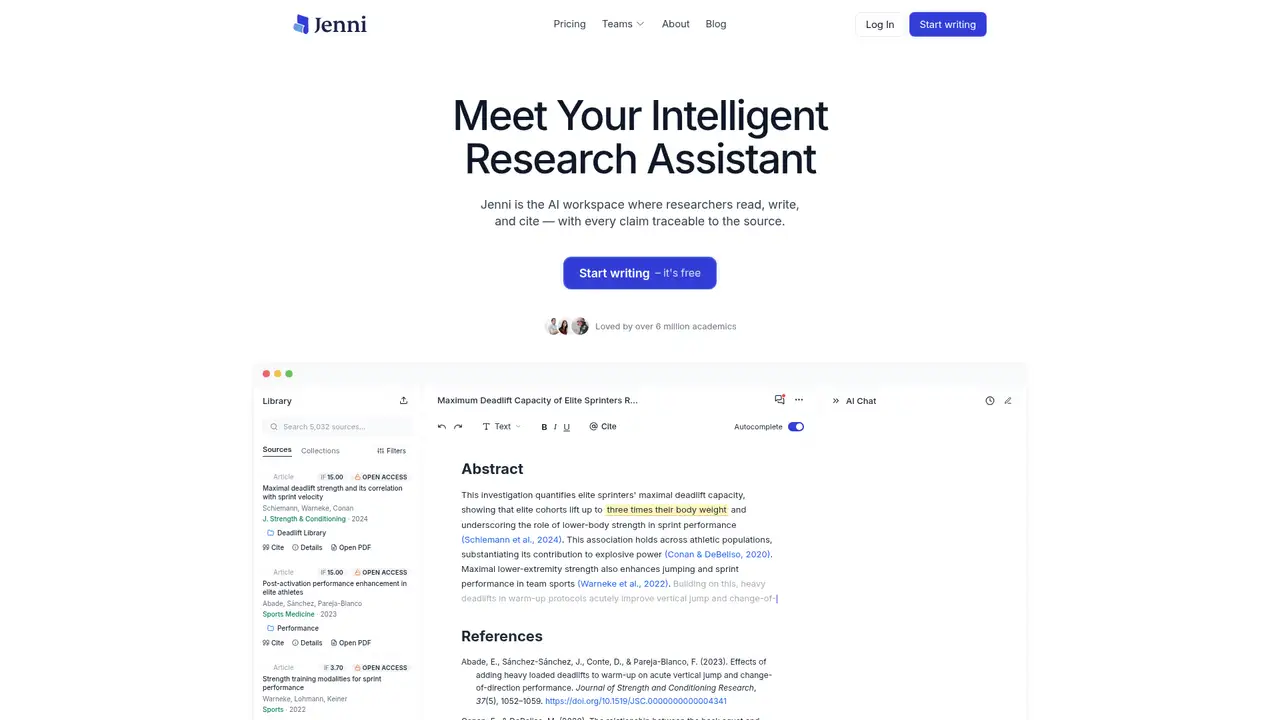
Jenni AI is an AI-powered research workspace designed for students, academics, and professional researchers. Its tools combine writing assistance with research-library functions, including autocomplete, document chat, editing, reviews, citation management, PDF uploads, literature review workflows, and exports. The product is positioned around communicating research rather than producing general marketing copy, which makes its plan limits relevant to academic workloads. Published details cover citation styles, library exports, PDF limits, literature review runs, and research gap analysis. The company reported more than 4.5 million academic users worldwide in figures discussed by BusinessWorld in July 2025. Jenni does not publish a launch year in the cited company materials. Buyers should still verify citations, source interpretation, originality, and compliance with institutional AI rules before submitting work.
A Jenni workflow may start with uploaded research PDFs and continue through drafting, autocomplete, AI chat, editing, reviews, citations, and export. Users can query PDFs within the workspace, while literature review and research gap analysis consume workflow allowances, making usage limits important for intensive projects. Free PDFs may reach 25 MB and 150 pages. Plus increases those limits to 100 MB and 500 pages, while Pro permits 1,000 pages. Documentation separates library exports from full document exports, with Plus and Pro offering all export formats and citation styles. This organization gives Jenni a more research-specific purpose than a general chatbot, though source checking remains necessary. A browser extension, version history, document publishing, and citation-style support add value for users managing continuing academic projects.
Jenni does not identify its underlying model vendors or versions in official materials. Its March 11, 2026 AI Chat Upgrade changed the AI Chat model, added DOCX import access, and set Plus allowances at 5,000 monthly autocomplete generations and 500 monthly AI edits. Documentation says relevant context may be sent to an upstream model provider when users request autocomplete, chat, editing, outlining, or review. Consequently, Jenni’s clearest technical distinction comes from its workspace, PDF limits, citation functions, and review workflows, not from a disclosed model lineup. Claims naming a particular GPT, Claude, or other model are unsupported by the company’s named materials. Buyers who prioritize model transparency may therefore find the product documentation incomplete, despite its detailed feature and usage descriptions.
Jenni’s Free plan costs $0 and includes 10 autocomplete generations daily, 10 PDF uploads, five one-time AI edits, five one-time AI chat messages, three reviews monthly, three lifetime workflows, and unlimited citations. Plus costs $30 monthly or $12 monthly with annual billing, providing 5,000 autocompletes, 500 edits and chat messages, 10 reviews, and 10 workflows each month. Pro costs $73 monthly or $29 monthly annually, with the main AI allowances unlimited. Annual totals are $144 for Plus and $348 for Pro. Local-currency and purchasing-power pricing may appear in the app. Paid plans also increase PDF size and page limits and expand exports. Buyers should compare expected monthly usage with annual commitment before choosing a tier.
Jenni is a stronger choice for research documents than ChatGPT because its published workflow combines citations, PDF libraries, reviews, and academic exports. ChatGPT is broader and may suit general brainstorming or varied tasks better. Paperpal is a closer academic-writing alternative, while Scite concentrates more on literature discovery and citation context. Jenni says drafts, prompts, and outputs are not used to train its models, sold, or used for advertising, although relevant context can be sent to an upstream provider when an AI feature is requested. The company does not publish an explicit commercial-rights guarantee for every generated output. Students, academics, and researchers needing source-aware drafting, citation support, and document exports should pick Jenni.
Who is Jenni AI best for?
- Students drafting papers with citations and uploaded PDFs.
- Researchers running literature reviews and gap analysis.
- Academics needing document export and citation styles.
- Teams seeking shared academic writing support.
Jenni AI Pricing (2026)
Pricing model: Freemium. All prices in USD.
| Plan | Price | What you get |
|---|---|---|
| Free | $0/month | 10 autocompletes daily, 10 PDF uploads, five one-time edits, five one-time chat messages, three reviews monthly, and three lifetime workflows. |
| Plus | $30/month or $12/month billed annually | 5,000 autocompletes, 500 edits and chat messages, 10 reviews, and 10 workflows monthly; PDFs up to 100 MB and 500 pages. |
| Pro | $73/month or $29/month billed annually | Unlimited autocomplete, edits, chat, reviews, and workflows; PDFs up to 100 MB and 1,000 pages. |
Pros and Cons
Pros
- The workspace combines drafting with PDF research tools.
- Free users receive unlimited citations.
- Plus includes 500 monthly edits and chat messages.
- Jenni says user writing is not used to train its models.
Cons
- Monthly prices rise substantially above annual rates.
- Underlying model names are not disclosed.
- Free workflow allowances expire after three lifetime runs.
Who should look elsewhere?
- Users wanting a general-purpose chatbot only.
- Researchers needing disclosed model vendors and versions.
- Users requiring a stated commercial-publication guarantee.
Technical Details
Frequently Asked Questions
How much does Jenni AI cost?
Jenni’s published prices are Free at $0, Plus at $30 monthly or $12 monthly when billed annually, and Pro at $73 monthly or $29 monthly when billed annually. Annual totals are $144 for Plus and $348 for Pro. Jenni says local currency may be available in the app, and annual billing includes a discount compared with monthly billing.
What are Jenni AI’s Free limits?
The Free plan includes 10 autocompletes per day, 10 PDF uploads, five one-time AI edits, five one-time AI chat messages, three reviews per month, and three lifetime workflow runs. Free PDFs can be up to 25 MB and 150 pages. Free users receive unlimited citations, while full document and library export features require paid plans.
How does Jenni AI compare with ChatGPT?
ChatGPT is a broader conversational assistant, while Jenni is organized around academic documents, citations, uploaded PDFs, reviews, and research workflows. ChatGPT may suit general brainstorming and varied tasks better. Jenni is more focused for source-based drafting and academic exports. Neither product removes the need to check factual claims, citations, quotations, or institutional policy requirements.
Does Jenni AI train on my writing?
Jenni’s documentation says drafts, prompts, and outputs are not used to train Jenni models, sold, or used for advertising. Relevant context may still be sent to an upstream provider when an AI feature is requested. Jenni says only context needed for that action is sent. Users should read the current privacy policy for provider and contractual details.
Can I use Jenni AI commercially?
Jenni’s cited pricing and policy pages describe product features and data handling, but they do not publish an explicit commercial-rights guarantee for every generated output. Commercial users should review Jenni’s current terms, keep human editorial control, and check licenses for uploaded sources, quotations, images, and any third-party material included in a final document.
Best Jenni AI Alternatives in 2026
These tools do the same job as Jenni AI, with different pricing, limits and trade-offs.

Citation context and evidence checks for scientific research
General-purpose AI assistance for writing, research, coding, and work
AI workflows for literature search, review, and research reports

Writing assistance across the apps you use every day

Academic editing, research discovery, and submission checks in one workspace