
Quadratic Review, Pricing & Alternatives (2026)
A spreadsheet where formulas, code, databases, and AI share one canvas
Last updated: October 26, 2026
What is Quadratic?
Quadratic is an AI-enabled spreadsheet for analysts and teams that want familiar cells alongside Python, SQL, JavaScript, charts, and live connections. Personal is free with limited AI, sharing, files, and connections; Pro is $18 per user monthly when billed annually, and Business is $36 per user monthly annually. Enterprise is custom and can include SSO and self-hosting.
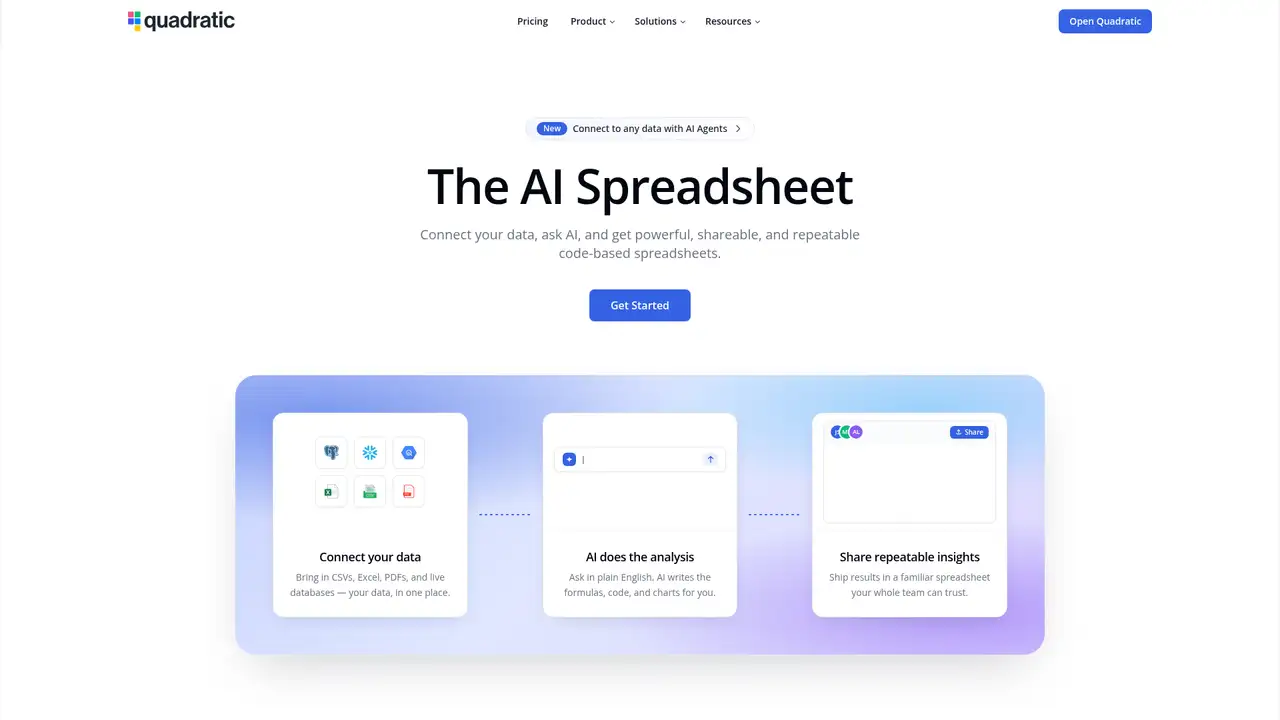
Quadratic is a spreadsheet product built around a grid that combines formulas with Python, SQL, JavaScript, charts, and AI. The company homepage says more than 250,000 people use it, including customers at companies and universities. Quadratic does not publish a founding year or funding total on its cited company and product pages, so its launch history and financing remain unspecified. The product focuses on data analysis rather than replacing every conventional operational spreadsheet workflow. Users can share, embed, import, and present files, with documented browser and desktop applications. Its positioning is closer to a code-enabled analysis workspace than a general Excel replacement, while enterprise plans add self-hosting and bring-your-own-model options. Personal is free, Pro starts at $18 per user monthly with annual billing, Business starts at $36, and Enterprise pricing is custom.
A typical session starts by importing CSV, Excel, Parquet, PDF, or image files, or by connecting PostgreSQL, MySQL, SQL Server, BigQuery, Snowflake, and other databases. Users can ask Quadratic AI to create formulas, Python, SQL, JavaScript, charts, or datasets, with results placed in cells. At-mentions give the model access to selected sheets, ranges, tables, or live connections. The assistant can trace a cell's value upstream through formulas, code, tables, or connections, and it presents a multiple-choice clarification when a request is ambiguous. Code cells can reference spreadsheet cells and return data to them, while live SQL queries return results directly into the sheet. Scheduled tasks, data validation, embedding, and team sharing support repeatable workbooks, although Personal limits sharing, files, connections, and AI usage.
Quadratic runs an AI-assisted spreadsheet where formulas, Python, SQL, JavaScript, charts, and live database connections share one canvas, rather than a separate chatbot attached to a grid. Its documentation describes model selection, durable personal, team, and connection memory, file attachments, and at-mentions for supplying selected sheets, ranges, tables, or connections. The current AI getting-started page identifies Claude Sonnet 5 as the default model, with additional models available on paid plans. AI can generate code, debug formulas, trace cell values, create charts, and build or augment datasets. Quadratic’s security documentation says prompts are routed among model providers with zero-day data retention policies, while Enterprise self-hosting supports bring-your-own-model deployments. Recent workflow additions include scheduled tasks, data validation, embedding, and imports for CSV, Excel, Parquet, PDF, and image files.
Personal is free, but limits AI usage, sharing, files, connections, and support, making it suitable for learning the spreadsheet or testing imports and analysis. Pro costs $18 per user per month with annual billing, or $20 with monthly billing. It includes $20 in monthly AI credits, additional model access, privacy controls, and unlimited sharing, files, and connections. Business costs $36 per user monthly when billed annually, or $40 with monthly billing. It includes $40 in monthly AI credits, on-demand credit purchases, and Pro features. Enterprise pricing is custom and can include custom AI usage, SSO, self-hosting, and dedicated support. Pro and Business use per-user billing, and new members are prorated. AI credits are fixed allowances on Pro and Business before add-on purchases.
The familiar grid combines formulas with Python, SQL, JavaScript, charts, and live database connections, so analysts can keep code-backed work in one file instead of moving to a notebook or BI tool. Personal is free, but limits AI usage, sharing, files, connections, and support, making it better for evaluation than team work. Pro starts at $18 per user monthly with annual billing and includes $20 in monthly AI credits, while Business starts at $36 with $40 in credits. Excel and Google Sheets remain stronger for broad conventional compatibility. Hex is better suited to collaborative notebook analytics, while Airtable fits lightweight operational databases. Self-hosting and bring-your-own-model support are Enterprise options, not features of the free edition. Choose Quadratic if you want spreadsheet interaction with reproducible Python or SQL analysis and live data.
Who is Quadratic best for?
- Analysts mixing spreadsheet formulas with Python or SQL.
- Teams sharing repeatable, code-based spreadsheet analyses.
- Users importing files and querying live databases.
- Organizations needing enterprise self-hosting and BYOM discussions.
Quadratic Pricing (2026)
Pricing model: Freemium. All prices in USD.
| Plan | Price | What you get |
|---|---|---|
| Personal | $0/month | Limited AI usage, sharing, files, connections, and support. |
| Pro | $18/user/month billed annually, $20 monthly | Includes $20 monthly AI credits, additional models, privacy controls, and unlimited sharing, files, and connections. |
| Business | $36/user/month billed annually, $40 monthly | Includes $40 monthly AI credits, on-demand credit purchases, and everything in Pro. |
| Enterprise | Custom | Custom AI usage, SSO, self-hosting option, and dedicated support. |
Pros and Cons
Pros
- Python, SQL, JavaScript, and formulas coexist in one sheet.
- AI can generate code, datasets, formulas, and charts.
- Live database queries return results directly into cells.
- Enterprise offers self-hosting and bring-your-own-model options.
Cons
- Personal limits sharing, files, connections, and AI usage.
- AI credits are fixed on Pro and Business before add-ons.
- Self-hosting is an Enterprise option rather than a public free edition.
Who should look elsewhere?
- People needing maximum Excel compatibility.
- Teams wanting a no-code-only spreadsheet.
- Users needing unlimited AI on the free plan.
Technical Details
Frequently Asked Questions
How much does Quadratic cost?
Personal is free. Pro costs $18 per user monthly with annual billing, or $20 with monthly billing. Business costs $36 annually billed or $40 monthly. Pro includes $20 in monthly AI credits, and Business includes $40. Enterprise pricing is custom and can include SSO, self-hosting, dedicated support, and custom AI usage.
Is Quadratic free?
Yes, Personal costs $0, but it limits AI usage, sharing, files, connections, and support. It is suitable for learning the spreadsheet and testing imports or analysis. Unlimited sharing, files, and connections begin on Pro, which also adds $20 of monthly AI credits and additional model access.
How does Quadratic compare with Excel?
Excel has broader conventional spreadsheet compatibility and a mature desktop workflow. Quadratic is more specialized for data analysis with Python, SQL, JavaScript, live database connections, and AI that writes code and charts into the sheet. Teams prioritizing existing Excel workbooks should favor Excel; analysts wanting code-backed, connected analysis should consider Quadratic.
Does Quadratic use customer data to train AI models?
Quadratic's security documentation says its model providers use zero-day data retention policies with Quadratic. It also says users can disable prompt storage in team settings. Enterprise self-hosting with bring-your-own-model is designed to keep data inside the customer's infrastructure. The documentation does not make a broad claim that every provider's general training policy is identical.
Can Quadratic be used commercially or self-hosted?
Quadratic has Pro, Business, and Enterprise plans intended for team use, so commercial work is within its service model subject to subscription terms. Enterprise includes a self-hosting option, and the security documentation describes BYOM for that deployment. Quadratic does not present the hosted spreadsheet as an open-source product.
Best Quadratic Alternatives in 2026
These tools do the same job as Quadratic, with different pricing, limits and trade-offs.