
Cap Review, Pricing & Alternatives (2026)
Open source screen recording with local control and shareable links
Last updated: October 26, 2026
What is Cap?
Cap is an open source screen recording and sharing platform from Cap Software. Personal use is free, commercial desktop rights cost $29 per license yearly or $58 once, and Cap Pro costs $12 per user monthly or $8.16 monthly when billed annually. Pro adds unlimited cloud storage, AI, analytics, team workspaces, custom domains, and integrations.
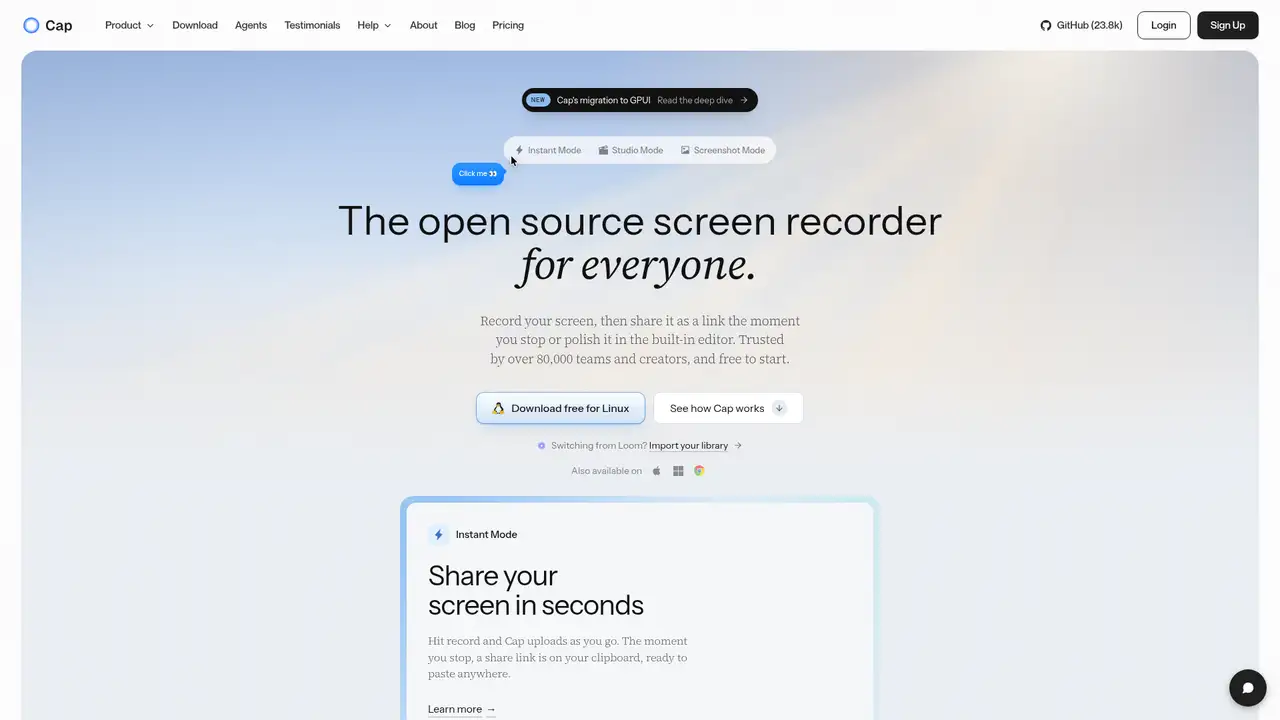
Cap began in 2023 as an open source alternative to Loom and reached a public beta on April 25, 2024. Its website reports more than 80,000 users, while the beta announcement identifies Richie McIlroy as founder. The public repository was created in November 2023. Cap provides screen recording and sharing through local recording, cloud delivery, custom storage, and self-hosting. Its stated principles emphasize privacy, transparency, community, and ownership of recordings, which can matter when teams need control over where recordings reside and how they are administered. Available material does not state a funding amount, acquisition, or category change, so those topics remain unasserted. The FAQ and product materials identify macOS and Windows as supported desktop platforms for recording and sharing.
Cap divides recording into Instant Mode for quick captures and Studio Mode for local recording, editing, and polished output. The repository describes screen, camera, and microphone capture, followed by a share link or export, so a user can record a short explanation or prepare a finished presentation. Studio tools include backgrounds, zooms, trimming, captions, and export controls. Comments, reactions, transcripts, viewer analytics, team workspaces, custom domains, password-protected shares, and a Loom video importer support review and distribution. Storage may use Cap Cloud, local files, custom S3-compatible storage, Google Drive, or a self-hosted deployment. The desktop application can point to a self-hosted Cap server, allowing teams to choose hosted convenience or retain greater control over storage and deployment.
Cap's published architecture combines a Tauri desktop application with Rust recording and media crates and a Next.js web application. The repository also names SolidStart, TypeScript, Drizzle, MySQL, Docker, and shared media packages. Most content uses AGPLv3, while the cap-camera and scap crate families use MIT licensing, creating different considerations for reuse. Product materials advertise capture up to 4K at 60 frames per second, system audio, webcam overlays, and AI captions. Release history lists Google Drive storage, merged recordings, screenshot OCR, camera background blur, and a sturdier recorder in version 0.5 in May 2026. Version 0.6 in September 2026 added a redesigned editor, 3D scenes, animated text, Studio Sound, and an early native GPUI application.
Cap's Free plan supports personal use, local recording and sharing, and Studio Mode. The pricing page lists 4K and 60fps export, export to any format, and shareable links lasting up to five minutes, but excludes commercial use. Desktop License costs $29 per license per year or $58 once for a non-renewing license. It adds commercial rights, unlimited local recording and editing, Studio Mode, exports, and 20 cloud shareable links monthly, each lasting up to five minutes. Cap Pro costs $12 per user monthly or $8.16 monthly when billed annually. Pro adds unlimited cloud storage and bandwidth, AI, analytics, team workspaces, custom domains, password-protected shares, and storage integrations. SAML SSO costs $199 monthly, and a signed BAA costs $99 monthly, giving organizations separate options for identity administration and contractual coverage.
Cap's clearest limitation is the divide between personal and commercial use, since commercial rights require Desktop License or Pro. Self-hosting supplies control, but the customer must operate deployment, storage, maintenance, and related infrastructure. AGPLv3 may also affect organizations that modify and distribute covered code. Cap Cloud lists SOC 2 Type II, ISO 27001, and HIPAA compliance, whereas self-hosting places operation within the customer's environment and responsibilities. Loom is a more established hosted alternative, Screen Studio targets polished Mac production, and Tella emphasizes presentation workflows. Choose Cap for open source code, local recording, self-hosting, or customer-controlled storage. Choose Loom for a managed hosted service, Screen Studio for Mac-focused production, or Tella for presentation-centered workflows when those priorities matter more.
Who is Cap best for?
- Teams needing open source screen recording and sharing.
- Businesses requiring self-hosting or controlled storage.
- Creators making tutorials, demos, or client updates.
- Loom users wanting a built-in importer.
Cap Pricing (2026)
Pricing model: Freemium. All prices in USD.
| Plan | Price | What you get |
|---|---|---|
| Personal | Free | Personal use, local recording and sharing, and Studio Mode; commercial use is excluded. |
| Desktop License | $29/year or $58 one-time | One user, unlimited local recording and editing, commercial rights, and 20 monthly links up to five minutes each. |
| Cap Pro | $12/month or $8.16/month billed annually | Unlimited cloud storage and bandwidth, AI, team workspaces, analytics, custom domain, and integrations. |
| SAML SSO | $199/month | Unlimited users as an Enterprise add-on. |
| Signed BAA | $99/month | Per-organization Enterprise add-on. |
Pros and Cons
Pros
- Cap supports local recording and several storage choices.
- Its public repository supports code inspection.
- Pro includes unlimited cloud storage and team workspaces.
- Self-hosting supports customer-controlled infrastructure.
Cons
- The free plan excludes commercial use.
- Self-hosting requires infrastructure and maintenance.
- Enterprise identity features cost extra.
Who should look elsewhere?
- Organizations wanting a closed-source managed recorder.
- Commercial users unwilling to buy a license.
- Mac editors seeking deeper production controls.
Technical Details
Frequently Asked Questions
How much does Cap cost?
Cap is free for personal use. A commercial Desktop License costs $29 per license yearly or $58 as a one-time license. Cap Pro costs $12 per user monthly, or $8.16 per user monthly with annual billing. SAML SSO costs $199 monthly, and a signed BAA costs $99 monthly as optional Enterprise add-ons.
Can I use Cap commercially for free?
No. Cap's free plan is for personal use, while commercial rights require Desktop License or Cap Pro. Desktop License includes local recording, editing, exports, and 20 monthly cloud shareable links of up to five minutes each. Pro includes those rights plus cloud sharing, AI, analytics, and team collaboration.
Cap or Loom: which should I choose?
Choose Cap when open source code, self-hosting, local recording, or controlled storage matters. Choose Loom when a hosted service better fits your requirements. Cap includes a Loom video importer and supports cloud, local, custom S3, Google Drive, and self-hosted storage. The free Cap plan excludes commercial use.
Does Cap train on recordings?
The company do not state whether Cap trains models on recordings. They state that recordings can remain local, use custom S3 storage or Google Drive, or run through self-hosting. The pricing page says recordings remain yours after cancellation. Review Cap's current privacy and AI terms before uploading sensitive material.
Can I use Cap videos commercially?
Yes, a paid Desktop License or Cap Pro plan includes commercial usage rights. The pricing page describes client work, courses, and embedded recordings as permitted uses. The free version is for personal use only. Self-hosting does not remove licensing obligations, so organizations should review the applicable license terms.
Best Cap Alternatives in 2026
These tools do the same job as Cap, with different pricing, limits and trade-offs.

Async video messages with transcripts, AI summaries, and team workflows

Mac screen recordings with automatic zooms, framing, and polish
Screen recording that turns takes into polished, shareable videos
Screen recorder and editor for tutorials, with AI scripts, voices, avatars and dubbing