
Screen Studio Review, Pricing & Alternatives (2026)
Mac screen recordings with automatic zooms, framing, and polish
Last updated: October 26, 2026
What is Screen Studio?
Screen Studio is a macOS screen recorder and editor for product demos, courses, tutorials, and social posts. Created by Adam Pietrasiak with Maciej Gawinek and Dawid Wilewski, it launched in November 2022. Pricing lists $29 monthly, while the Teams page displays $9 per user monthly for yearly billing, with every feature included in each plan.
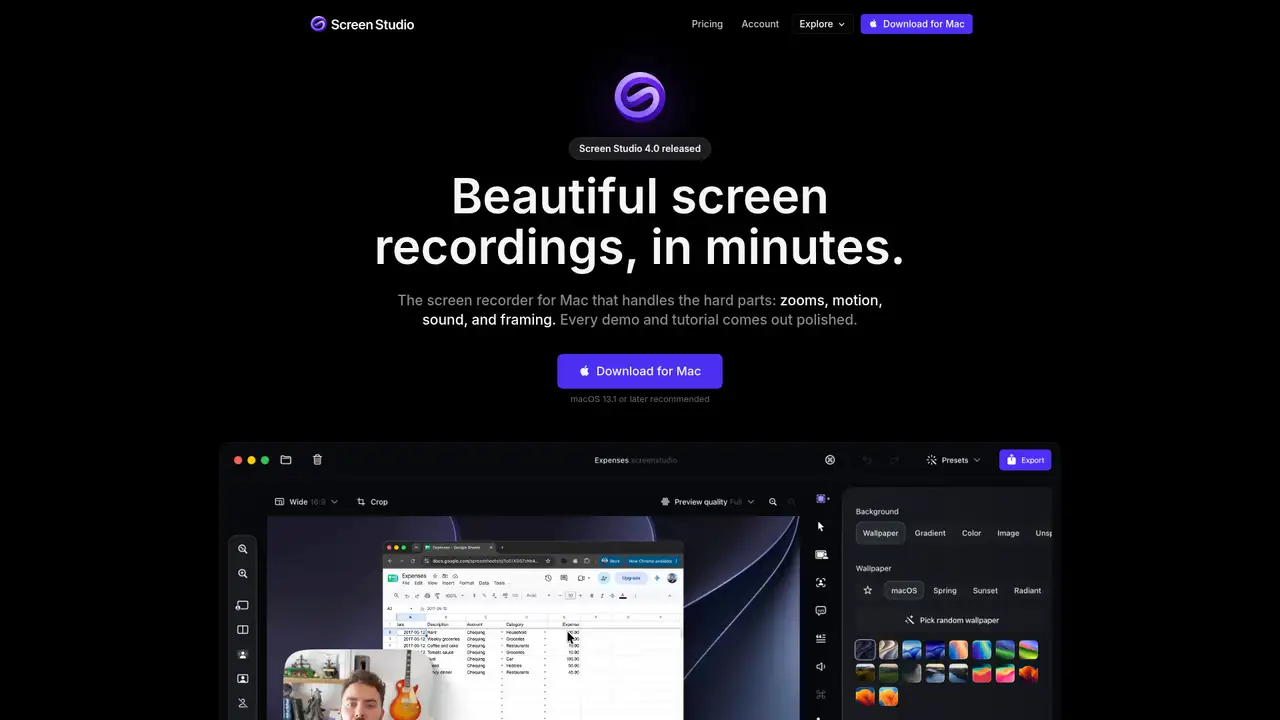
Screen Studio is a professional screen recorder for macOS, created by Adam Pietrasiak with Maciej Gawinek and Dawid Wilewski. Development began in October 2022, and Product Hunt records its public launch in November 2022. A July 2023 founder interview reported more than 8,000 customers. The product remains active and independent, with no reported acquisition or pivot. It is designed for product designers, developers, educators, marketers, and course creators who want attractive demos without learning a full video editor. Screen Studio requires macOS Ventura 13.1 or later and has no Windows or Linux version. Individual pricing is $29 per month, while team pricing is $9 per user monthly, with the yearly option billed annually. Every listed plan includes all features.
Screen Studio records an entire display, a window, or a selected area, with optional webcam, microphone, and Mac audio inputs. It saves takes to disk every two seconds and uses Apple's ScreenCaptureKit for capture. After recording, automatic zoom follows clicks and cursor movement. Smart framing, cursor effects, motion blur, backgrounds, shadows, captions, and device frames shape the result. Transcript editing can remove words, filler, or pauses, helping shorten spoken sections without rerecording. Users can export up to 4K at 60 frames per second, create shareable links, share projects, or publish a GIF. The workflow stays local and short: record, adjust, export, or share. Individual pricing is $29 monthly, while team plans list $9 per user monthly, billed either monthly or yearly, with every feature included.
Screen Studio uses native Apple capture and AVFoundation-oriented macOS processing rather than a cloud-first editing pipeline. The company says transcripts can use local Whisper or Apple's speech recognition, while noise reduction, Podcast voice processing, face tracking, cutouts, enhancement, and encoding run on the Mac. Cloud transcription is optional, and audio is deleted from the server after the transcript returns. The current site identifies Screen Studio 4.0 as released, but does not publish a dated 2025 or 2026 feature chronology. Its privacy model is the notable technology choice: recordings and projects stay local unless a user creates a share link, shares a project, requests cloud transcription, or generates an AI voiceover.
Screen Studio’s individual plan costs $29 per month, and the current plans include every feature, 4K video export at 60 FPS, shareable links, cloud transcripts, shared projects, and new releases. Teams pricing lists $9 per user per month for both monthly and yearly billing, but the public Teams page has an incomplete monthly display, so confirm the amount and billing terms at checkout. A one-time license was sold previously but is no longer available to new customers. Existing license holders can keep using their licenses and renew them for updates. Students may request a 40 percent discount. There is no permanent free plan, although outdated beta information may still appear online. Choose monthly individual billing for one user, or review team checkout for per-user pricing.
Screen Studio’s main limitation is platform support: it runs only on macOS, with no near-term Windows plan. Its local-first model makes collaboration and shareable links less central than in Loom or Tella. Loom suits browser-first team communication and Atlassian workflows, while Tella supports Mac, Windows, web recording, hosting, and broader team sharing. Descript is stronger for podcast production and multi-track text editing. Screen Studio’s blur effect is not a legal redaction tool, and project files retain original recordings, so sensitive material requires careful handling. Choose Screen Studio if you use a Mac and prioritize polished local exports, privacy controls, automatic motion, and consistent framing over broad platform coverage. Individual pricing is $29 monthly; team plans are $9 per user monthly, with all features included.
Who is Screen Studio best for?
- Mac users producing polished product demos.
- Educators recording tutorials and courses.
- Creators making social screen videos.
- Users seeking automatic zoom and motion effects.
Screen Studio Pricing (2026)
Pricing model: Paid. All prices in USD.
| Plan | Price | What you get |
|---|---|---|
| Individual monthly | $29/month | Every Screen Studio feature is included. |
| Teams yearly | $9/user/month billed yearly | The team checkout displays this per-user amount for yearly billing. Every Screen Studio feature is included. |
| Teams monthly | $9/user/month | The team checkout displays this per-user amount for monthly billing. Every Screen Studio feature is included. |
Pros and Cons
Pros
- Automatic zooms follow clicks.
- Motion blur and backgrounds polish recordings.
- Electron supports the desktop application.
- Every feature is included in every plan.
Cons
- The product supports macOS only.
- New customers cannot buy one time licenses.
- Blur cannot provide legal redaction.
Who should look elsewhere?
- Windows or Linux users.
- Users seeking a new one time license.
- Regulated workflows requiring legal redaction.
Technical Details
Frequently Asked Questions
How much does Screen Studio cost?
The product page lists Screen Studio at $29 per month. The Teams pricing page displays $9 per user per month for yearly billing. The published Teams extraction does not clearly state a separate monthly Teams amount. The product page says every feature is available in every plan.
Is Screen Studio free?
The company do not state a permanent free plan. They state that every feature is available in every plan and that the current product price is $29 per month. Older one time licenses are no longer available for new purchases, while existing license holders retain their licenses and can renew update access.
Who created Screen Studio?
Screen Studio was created by Adam Pietrasiak with Maciej Gawinek and Dawid Wilewski. The founder interview describes Adam as founder, Maciej as responsible for marketing, sales, and legal matters, and Dawid as responsible for customer success, roadmap, and product direction. BuildWith.app lists December 2022 as its first release.
Does Screen Studio support Windows?
No. The product page states that Screen Studio currently supports macOS and has no near future plans to add Windows support. It recommends macOS 13.1 or later. The company do not document a Linux version, so users on Windows or Linux should not assume compatibility.
Can Screen Studio blur sensitive information for compliance?
No. The DPA says not to rely on blur for legal redaction, GDPR or CCPA protection, HIPAA or medical record protection, legal discovery, or permanent removal of sensitive information. It advises using dedicated redaction software and warns that project files always contain original content.
Best Screen Studio Alternatives in 2026
These tools do the same job as Screen Studio, with different pricing, limits and trade-offs.
Transcript-based audio and video editing with an AI co-editor

Screen recording that turns takes into polished, shareable videos

Async video messages with transcripts, AI summaries, and team workflows
Screen recorder and editor for tutorials, with AI scripts, voices, avatars and dubbing