
Pinokio Review, Pricing & Alternatives (2026)
A local launcher for open-source AI applications and scripts
Last updated: October 26, 2026
What is Pinokio?
Pinokio is a free, open-source desktop launcher that installs and runs local AI applications through readable JSON scripts. It targets people who want to use projects such as image generators, chat interfaces, and audio tools without manually assembling dependencies. There is no subscription or hosted model fee; users supply hardware, storage, and any application-specific costs.
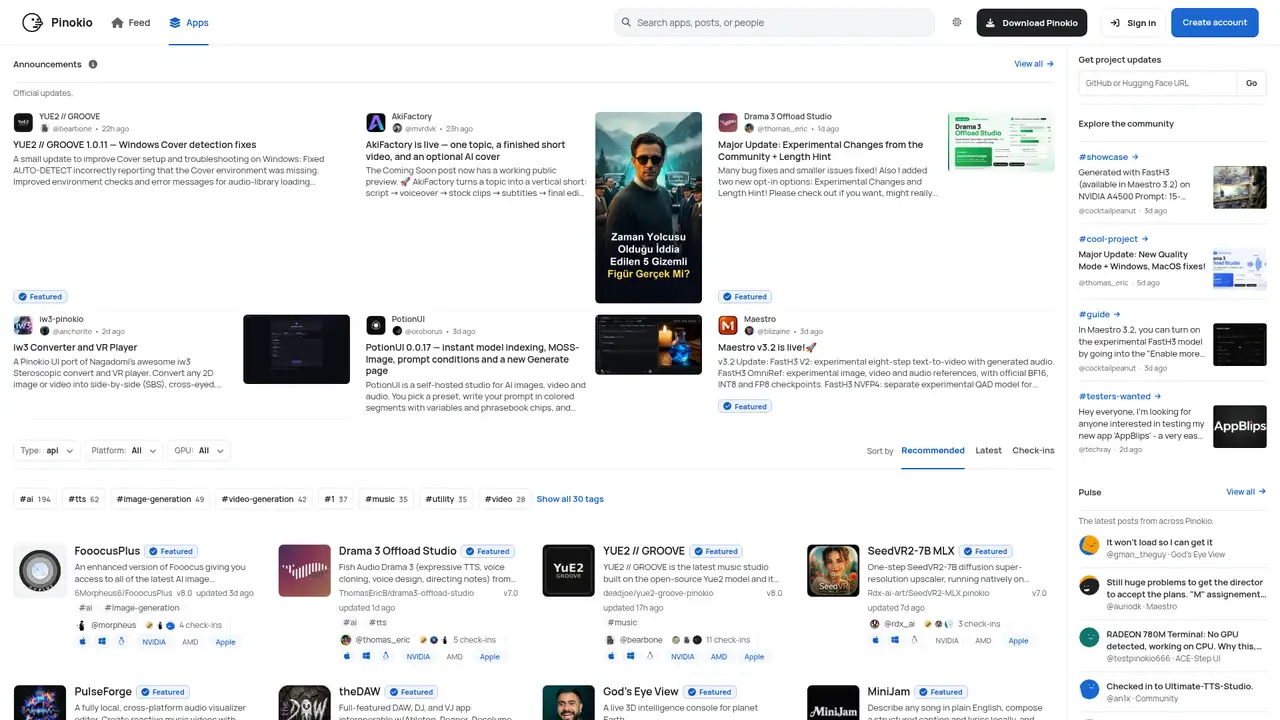
Pinokio is a free, open-source local AI browser and scriptable desktop launcher maintained by Pinokio Computer. Its public repository, created in 2023, uses the MIT license. Rather than providing models, hosted inference, or a universal runtime, it gives open-source applications a desktop entry point on Windows, macOS, and Linux. Readable JSON scripts can install packages, download models, manage dependencies, and start local services, while controls support starting, stopping, updating, and resetting projects. Pinokio describes itself as a user-friendly terminal with a graphical interface, an accurate model because it orchestrates commands on the user's computer instead of performing inference on Pinokio servers. Discover lists reviewed scripts, and users can also run scripts from public Git repositories.
A typical workflow starts by installing Pinokio, opening Discover, selecting an application, and approving its installation script. Pinokio creates project files under the user’s Pinokio directory, installs binaries and dependencies into managed locations, and provides start, stop, update, and reset controls. Developers can write pinokio.js scripts in JSON, use npm, pip, uv, or conda, run arbitrary shell commands, automate browser actions with Playwright, and manipulate JSON. Installed applications usually open in a local browser view. Scripts may download files, install models, execute commands, or contact external services, so users should review repositories, permissions, dependencies, licenses, and network behavior. Local sharing and home-server features can expose services beyond the computer.
Pinokio 8 expanded the launcher with a new interface, process monitoring, autolaunch, orchestration, one-click help, home-server features, and platform builds for Windows, macOS, and Linux. Earlier releases added JSON manipulation, Hugging Face command-line compatibility, Playwright browser control, and uv-based Python package management. Pinokio is a desktop JavaScript application that executes scripts and manages local processes, not a model provider, hosted inference API, or universal model runtime. Its readable JSON scripts can install packages, download models, start services, and run arbitrary shell commands, so script review remains important. The selected project determines the runtime, model requirements, licenses, and network behavior. Projects may use llama.cpp, ComfyUI, Stable Diffusion, Whisper, Ollama, or another application. Hardware performance varies by project, operating system, model, and GPU.
Pinokio is free to download, with no public paid plans, usage meter, hosted inference charge, or included model quota. Its practical costs are local: storage for environments and model files, memory, electricity, and suitable hardware, including a compatible GPU for demanding workloads. An application installed through Pinokio may separately require an external API key or charge for an online service. Pinokio’s release documentation says the program does not transfer information to other networked systems unless the user or operator specifically requests it. This does not make third-party scripts or applications private by default. Scripts can download files, execute commands, contact external services, or expose local services. Review each repository, requested permissions, model license, privacy policy, and network behavior before installation. This tool suits users willing to manage local hardware and inspect executable scripts.
The main limitation is that Pinokio simplifies setup without eliminating operational risk. Its readable JSON scripts can execute arbitrary commands, large model downloads consume storage, and updates can break applications or dependencies. Unlike Ollama, which focuses on a consistent local language-model runtime, Pinokio supports more application types but offers less runtime consistency. Compared with LM Studio, it provides a broader script and application workflow but a less focused chat interface. Compared with Stability Matrix, Pinokio is more general and programmable, while Stability Matrix specializes in image-generation packages. It also is not a hosted service, model provider, or managed inference API. Pinokio suits users who want graphical access to varied local projects and developers who want shareable installers, provided they inspect scripts, check licenses, and manage hardware. Beginners and developers should pick Pinokio.
Who is Pinokio best for?
- Pinokio suits beginners installing several open-source AI applications locally.
- It suits developers packaging repeatable local setup scripts.
- It suits users on Windows, macOS, or Linux desktops.
- It suits people wanting browser controls for local services.
Pinokio Pricing (2026)
Pricing model: Free. All prices in USD.
| Plan | Price | What you get |
|---|---|---|
| Desktop application | $0 | No hosted inference quota or subscription. Storage, hardware, models, and third-party API charges are separate. |
Pros and Cons
Pros
- Pinokio installs many local AI applications through a graphical workflow.
- Its readable JSON scripts are inspectable and shareable by developers.
- It supports Windows, macOS, and Linux desktop systems.
- The launcher and repository are MIT licensed and free.
Cons
- Scripts can execute arbitrary commands on the host computer.
- Each installed application brings its own runtime and requirements.
- Large models and environments can consume substantial disk space.
Who should look elsewhere?
- It is unsuitable for teams seeking a managed cloud inference API.
- It is unsuitable for users unwilling to run third-party scripts.
- It is unsuitable for computers lacking sufficient storage or acceleration.
Technical Details
Frequently Asked Questions
Is Pinokio free?
Yes. Pinokio is free to download and its public repository uses the MIT license. It does not charge a subscription or include a hosted inference quota. You still pay ordinary local costs such as suitable hardware, electricity, storage, and model files. An application installed through Pinokio may separately request an external API key or charge for an online service.
Does Pinokio provide AI models?
No. Pinokio is a local launcher and script environment, not a model provider. Its scripts install or start other projects, which may download models from services such as Hugging Face or use files already on the computer. The selected application determines the model format, runtime, hardware needs, and license. Pinokio does not supply universal hosted inference.
Pinokio or Ollama: which should I choose?
Choose Ollama for a focused command-line and API workflow around local language models. Choose Pinokio when you want to install and operate a wider range of local AI applications, including image, audio, and browser-based projects. Pinokio can install projects that use Ollama, but it does not replace Ollama's model runtime. The tradeoff is flexibility and more variation in script maintenance.
Does Pinokio send my data for training?
Pinokio's release policy says the program will not transfer information to other networked systems unless specifically requested by the user or operator. That statement concerns the launcher, not every script or application it runs. A selected project may contact an external API, download files, or expose a local service. Inspect scripts and application privacy policies, and apply network controls suitable for your security requirements.
Can I use Pinokio commercially?
The Pinokio repository is MIT licensed, which generally permits commercial use, modification, and redistribution subject to the license notice. That permission does not cover every application, model, dependency, or script installed through Pinokio. Check each project's license and the model's terms before commercial distribution. If an application calls a paid API, its provider's commercial and usage terms also apply.
Best Pinokio Alternatives in 2026
These tools do the same job as Pinokio, with different pricing, limits and trade-offs.