
MacWhisper Review, Pricing & Alternatives (2026)
Local transcription and dictation for Mac audio files and meetings
Last updated: October 26, 2026
What is MacWhisper?
MacWhisper is a macOS transcription app from Good Snooze for recordings, meetings, videos, podcasts, and dictation. It runs Whisper-family and other speech models locally, with exports, subtitles, speaker recognition, and optional AI services. The free edition costs €0, while the direct-download Pro license costs €64 once, with lifetime updates.
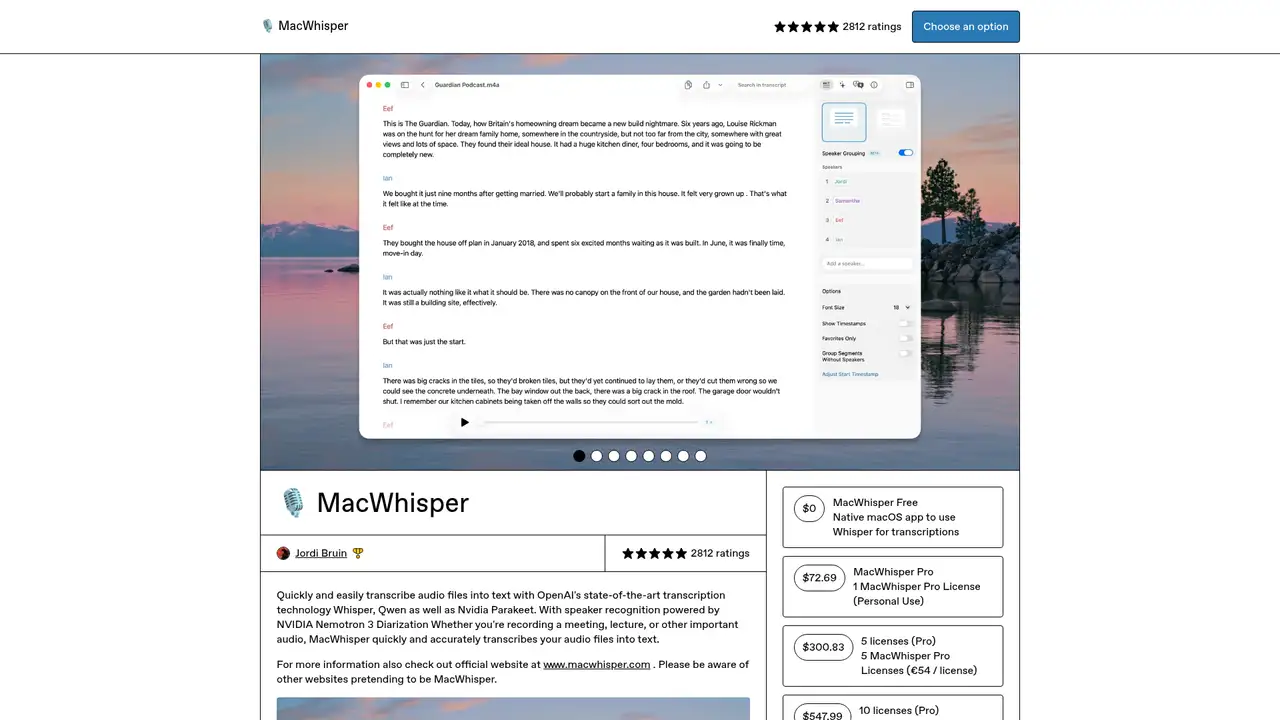
MacWhisper is a native macOS transcription app made by Jordi Bruin and Good Snooze. It turns local audio and video into searchable transcripts rather than functioning as a browser-based meeting workspace. The company says it supports more than 100 languages and local processing. The direct-download Mac app is distributed through Gumroad, while the Mac App Store version is called Whisper Transcription. MacWhisper records microphones, application audio, and online meetings without requiring a meeting bot. It also provides system-wide dictation, MDM deployment, and file exports. Whisper Transcription is available on macOS, iPhone, and iPad, although those versions have different purchasing and feature arrangements. Users can import files, record audio, capture meetings, transcribe YouTube links, or dictate system-wide before searching, editing, and exporting results.
A typical job begins with a dragged-in file, microphone recording, application audio, meeting capture, YouTube URL, or system-wide dictation session. Users select a local model, transcribe the material, search or edit the result, and export subtitles or documents. Supported formats include MP3, WAV, M4A, OGG, OPUS, MOV, and MP4. Exports include SRT, VTT, TXT, Markdown, PDF, HTML, DOCX, CSV, and the app’s project format. Pro adds batch transcription, automatic speaker recognition, grammar improvement in dictation, watched folders, real-time meeting transcription, CLI control, and workflows for Notion, Zapier, Make, n8n, Obsidian, and webhooks. Users can also connect compatible cloud or local AI providers for prompts and translation. Local transcription, file import, recording, core exports, and support for more than 100 languages are available in the free edition.
Whisper models remain MacWhisper’s foundation, alongside WhisperKit, distilled models, Nvidia Parakeet, Qwen3-ASR, and Nemotron 3 Diarization. MacWhisper 13 added Parakeet support in June 2025, according to 9to5Mac. The current product listing says Parakeet v2 and v3 can reach up to 300 times real-time transcription on Apple silicon, although speed depends on hardware and settings. Qwen3-ASR requires macOS 26 and an Apple silicon Mac. Local transcription is the default, but cloud transcription, DeepL translation, and AI prompts send relevant audio or transcript content to external providers. Ollama and LM Studio provide local options for AI prompts. MacWhisper supports automatic speaker recognition, watched folders, real-time meeting transcription, CLI control, and exports including SRT, VTT, TXT, Markdown, PDF, HTML, DOCX, and CSV.
The official site lists MacWhisper Free at €0 per month and MacWhisper Pro at €64 per license, paid once with lifetime updates. Free includes local transcription, recording, file import, core exports, and more than 100 languages, while Pro adds larger or additional models, batch jobs, diarization, AI-assisted cleanup, integrations, CLI automation, and advanced meeting features. The direct-download personal license has a soft three-device limit. Good Snooze also lists volume packs at €125 for five, €220 for ten, and €400 for twenty licenses. The Mac App Store and iOS versions use separate subscription options, so their pricing should not be conflated with the direct-download license. The direct-download Mac app is distributed through Gumroad, while the App Store edition is called Whisper Transcription and is available on macOS, iPhone, and iPad.
MacWhisper’s strongest case is private, local transcription, but results vary with model, hardware, audio quality, and speaker separation. TidBITS recorded a 3.7 percent average word error rate for MacWhisper Pro using Large V2 in one comparison, versus 6.6 percent for macOS Notes. An independent review found speaker recognition could identify too many speakers. Descript offers a more collaborative cloud editor, Otter.ai is better suited to shared meeting transcripts, and Aqua Voice focuses more directly on cross-application voice input. MacWhisper has broader file and offline workflows than those alternatives, but its direct-download product is Mac-focused and cloud AI features require careful provider choices. The direct-download Pro license costs €64 once and includes lifetime updates, while the free edition provides local transcription, recording, file import, and core exports. Mac users handling sensitive recordings should consider MacWhisper.
Who is MacWhisper best for?
- Mac users transcribing interviews, podcasts, lectures, and meetings locally.
- Journalists handling sensitive recordings without a recurring direct-download fee.
- Creators producing subtitles and documents from audio or video files.
- Power users automating transcription through CLI, watched folders, and webhooks.
MacWhisper Pricing (2026)
Pricing model: Freemium. All prices in USD.
| Plan | Price | What you get |
|---|---|---|
| Free | €0/month | Local transcription, recording, file import, core exports, and more than 100 languages. |
| Pro | €64/license, one-time | Lifetime updates, larger models, batch transcription, diarization, AI features, integrations, CLI, and advanced meeting tools. |
| Volume licenses | €125/5, €220/10, €400/20 | One-time direct-download licenses; larger packs and MDM arrangements require contacting Good Snooze. |
| Whisper Transcription App Store | Subscription; storefront pricing varies | The App Store version offers weekly, monthly, and yearly subscriptions; prices vary by storefront. |
Pros and Cons
Pros
- Local models keep default transcription on the device.
- The direct-download edition has no recurring subscription.
- Pro supports batch jobs, subtitles, diarization, and CLI workflows.
- Users can connect cloud or local AI providers with their own keys.
Cons
- Advanced direct-download features require a Pro purchase.
- Cloud translation and AI prompts transmit content externally.
- Speaker recognition can mislabel or overcount speakers.
Who should look elsewhere?
- People needing a browser-first collaborative transcript workspace.
- Users requiring Windows or Android desktop applications.
- Teams wanting managed cloud summaries without configuring AI providers.
Technical Details
Frequently Asked Questions
How much does MacWhisper cost?
The official MacWhisper site lists Free at €0 per month and Pro at €64 per license with lifetime updates. Gumroad is the direct purchase channel and publishes prices in euros. Good Snooze also lists volume licenses, including €125 for five, €220 for ten, and €400 for twenty licenses. App Store pricing is separate and uses subscriptions.
Is MacWhisper free?
Yes. MacWhisper Free includes local transcription, recording, file import, core exports, and support for more than 100 languages. Pro adds larger or additional models, batch transcription, automatic speaker recognition, AI-assisted cleanup, watched folders, integrations, CLI control, and advanced meeting features. The direct-download Pro edition is a one-time purchase rather than a recurring subscription.
MacWhisper or Otter.ai: which should I choose?
MacWhisper suits users who want local processing, file-based work, and a one-time direct-download license. Otter.ai is better suited to a cloud workspace centered on shared meeting transcripts. MacWhisper can use cloud providers when selected, but its local models support offline work and keep default transcription on the device.
Does MacWhisper send recordings to the cloud?
By default, local models transcribe audio on the Mac or iOS device, and transcription data stays local. Cloud transcription providers, DeepL translation, and AI prompt services transmit relevant content to those providers. Ollama and LM Studio can process AI prompts locally. MacWhisper’s privacy policy says anonymous licensing analytics may be sent.
Can MacWhisper be used commercially?
The licensing documentation describes a personal direct-download license and volume licenses for organizations. Commercial use depends on the applicable license, the source audio, and any external model or provider terms. Businesses distributing transcripts or subtitles should review those terms before publication, especially when cloud transcription or AI services are involved.
Best MacWhisper Alternatives in 2026
These tools do the same job as MacWhisper, with different pricing, limits and trade-offs.

Flexible local-first dictation with custom modes, model choice, and AI rewriting.
Automatic meeting transcription, summaries, and searchable conversation memory
Transcript-based audio and video editing with an AI co-editor

Context-aware dictation for writing into almost any app