
Krisp Review, Pricing & Alternatives (2026)
Clearer calls, AI meeting notes, and voice infrastructure for agents
Last updated: October 26, 2026
What is Krisp?
Krisp is a voice AI platform from Krisp Technologies for individuals, distributed teams, contact centers, and voice-agent builders. It combines local noise cancellation with transcription, meeting notes, accent conversion, contact-center tools, and developer SDKs. Meeting AI starts at $8 per user monthly with annual billing, after a seven-day trial and without a permanent free plan.
Krisp Technologies, Inc. develops software for real-time voice communication. Founded in 2017, the company says its technology is deployed on more than 200 million devices and processes more than 80 billion minutes of voice conversations monthly. Its product line extends beyond desktop noise filtering: Meeting AI handles transcription and notes, Contact Center AI supports agent productivity, and developer products provide voice models and real-time translation. Krisp raised a $5 million Series A in 2019, according to its year-in-review announcement. Headquartered in Berkeley, California, the company serves consumers, businesses, contact centers, and developers. This range means prospective customers should identify their use case before comparing plans, because the products have separate purposes and purchasing paths.
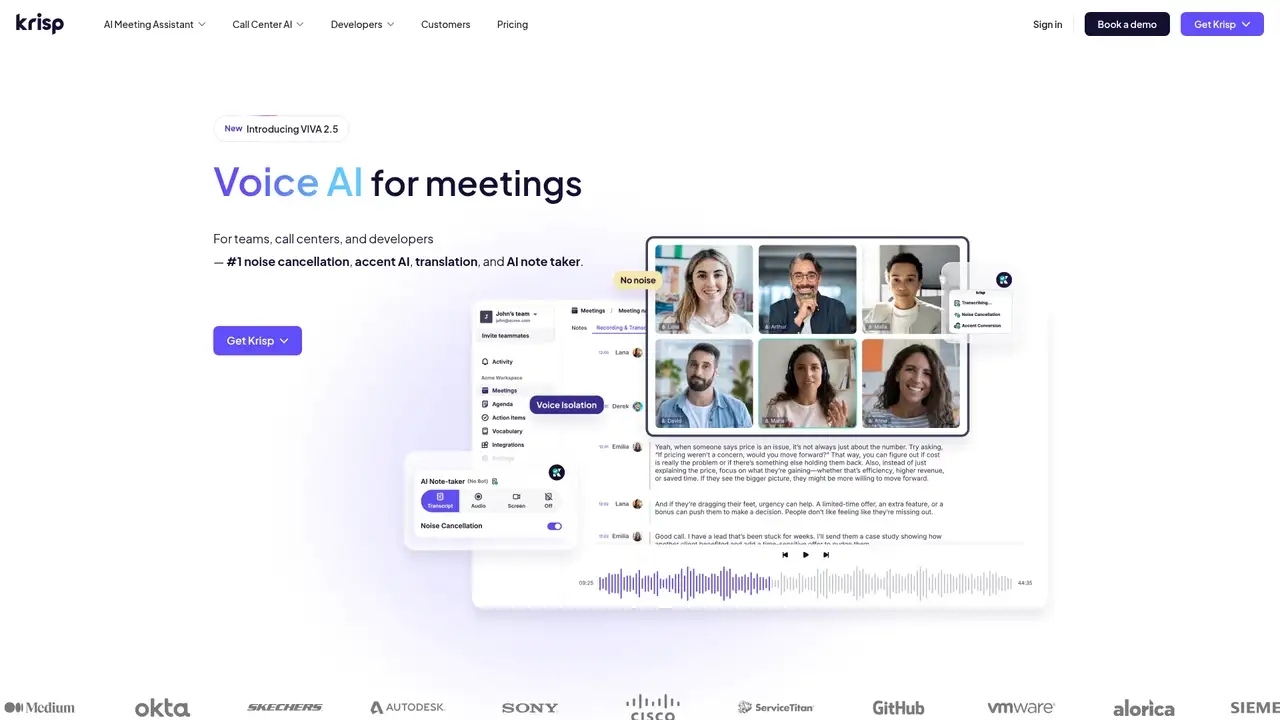
A typical Meeting AI workflow places Krisp between the user and Zoom, Teams, Google Meet, or another calling application as a virtual microphone and speaker. Noise cancellation runs locally. The optional AI assistant captures meeting audio, creates a transcript, and produces notes, action items, and searchable chat. Paid Meeting plans include bot-free recording and notes for in-person meetings. Integrations and webhooks can connect outputs with other workflows, while mobile access extends note-taking beyond a desktop call. Contact Center AI adds after-call summaries, monitoring, agent assist, speech analytics, and accent conversion for live customer conversations. Teams can use Krisp to improve what participants hear or reduce the manual work required after conversations end.
Krisp uses different technical approaches across its products. Desktop noise cancellation and SDK models can run on-device or on a customer’s servers, while cloud APIs expose real-time speech models through WebSockets. In February 2026, Krisp introduced a voice-translation SDK supporting more than 60 languages, custom vocabulary, and Windows, macOS, and Web deployments. In May 2026, its VIVA update combined voice isolation, voice activity detection, turn prediction, interruption prediction, and signal detection in a CPU-oriented server-side SDK. The company also describes 2026 turn-prediction and interruption models designed for low-resource real-time inference. These deployment choices determine whether processing occurs locally, on customer infrastructure, or through Krisp’s cloud.
Meeting AI pricing is straightforward but does not remain free beyond evaluation. The seven-day trial costs $0 and includes unlimited transcription, noise cancellation, recording, and AI notes, with limited accent conversion. Core costs $16 per user monthly, or $8 per user monthly when billed annually, and includes 10 GB of storage and one hour of daily accent conversion. Advanced costs $30 monthly, or $15 annually, with 60 GB of storage, four hours of daily speaker-side accent conversion, Salesforce, ConnectWise, and manager controls. Enterprise pricing is custom and adds SSO, SCIM, on-device private transcription and recording, unlimited storage, and data-center choice. Call Center and Developer products are separate purchases, so total costs depend on the selected product.
Krisp’s strongest distinction is its combination of local noise removal, bot-free meeting capture, accent conversion, and voice-agent infrastructure. Its cloud meeting features still require trust in a service handling transcripts and recordings, while Core storage is limited to 10 GB. The product line may also be confusing because Meeting AI, Contact Center AI, and developer APIs have separate plans and billing. Otter.ai and Fireflies.ai provide established meeting-transcript alternatives, while Zoom AI Companion may cost less for organizations already paying for Zoom. Krisp should be chosen by teams that need audio processing as well as meeting notes, especially contact centers and voice-agent builders. Teams seeking only basic transcription may find a narrower meeting tool easier to evaluate and administer.
Who is Krisp best for?
- Remote teams that need bot-free notes and local noise cancellation.
- Contact centers handling multilingual or heavily accented calls.
- Developers building real-time voice agents on CPU infrastructure.
- Enterprises requiring SSO, private processing, and compliance controls.
Krisp Pricing (2026)
Pricing model: Freemium. All prices in USD.
| Plan | Price | What you get |
|---|---|---|
| Meeting AI Free Trial | $0 for 7 days | Unlimited transcription, noise cancellation, audio and video recording, and AI notes; limited accent conversion. No credit card required. |
| Meeting AI Core | $16/month or $8/month billed annually per user | Unlimited transcription, recording, noise cancellation, AI notes, and integrations; 1 hour/day accent conversion and 10 GB storage. |
| Meeting AI Advanced | $30/month or $15/month billed annually per user | Everything in Core; speaker-side accent conversion up to 4 hours/day, unlimited listener-side conversion, Salesforce, ConnectWise, manager view, and 60 GB storage. |
| Meeting AI Enterprise | Custom | Everything in Advanced plus SSO/SCIM, on-device private transcription and recordings, data-center choice, unlimited storage, usage analytics, and dedicated account management. |
| Call Center AI CC Core | $15/agent/month billed annually | Agent and customer noise cancellation, agent voice isolation, after-call summaries, SSO/SCIM, usage analytics, monitoring, and centralized team management. |
| Call Center AI CC Advanced | Custom | CC Core plus agent and customer accent conversion, speech analytics, agent assist, voice macros, and optional voice-security features. |
| Developer Early Stage | Custom | VIVA and RTC models for voice isolation, VAD, turn and interruption prediction, signal detection, noise cancellation, accent conversion, and voice translation. Separate self-serve translation API includes 60 free minutes. |
| Developer Enterprise | Custom | Early Stage features plus higher-quality models, server-side batch processing, model customization, dedicated engineering support, custom SLAs, and volume pricing. |
Pros and Cons
Pros
- Noise cancellation processes locally in the desktop workflow.
- Core includes bot-free transcription, recording, and AI notes.
- Developer models support real-time voice-agent pipelines.
- Enterprise offers on-device transcription and data-center choice.
Cons
- The free option expires after seven days.
- Meeting plans cap storage at 10 GB or 60 GB before Enterprise.
- Contact Center and Developer pricing is less transparent than Meeting pricing.
Who should look elsewhere?
- Buyers seeking a permanent free meeting-notes plan.
- Teams wanting one subscription across every Krisp product line.
- Users who need unlimited cloud storage on the entry plan.
Technical Details
Frequently Asked Questions
How much does Krisp cost?
Meeting AI Core costs $16 per user monthly, or $8 per user monthly with annual billing. Advanced costs $30 monthly, or $15 annually. Enterprise pricing is custom. Call Center AI CC Core is listed at $15 per agent monthly billed annually, while CC Advanced and developer plans require a quote.
Does Krisp have a free plan?
Krisp offers a seven-day free trial rather than a permanent free Meeting AI plan. The trial includes unlimited transcription, noise cancellation, audio and video recording, and AI notes, with limited accent conversion. The pricing page says no credit card is required. After the trial, Meeting AI requires a paid plan.
How does Krisp compare with Otter.ai?
Otter.ai focuses primarily on cloud meeting transcription and summaries, while Krisp combines bot-free notes with local noise cancellation, recording, accent conversion, and voice infrastructure. Otter may suit teams focused on searchable transcripts. Krisp fits better when call audio quality, on-device processing, or contact-center voice features matter alongside notes.
Does Krisp train models on customer content?
Krisp’s developer terms say it will not use Customer Content to train, fine-tune, improve, evaluate, benchmark, or develop its models or third-party models. SDK content is processed locally in the customer environment. API inputs and outputs are processed transiently unless a storage feature is enabled, while usage data may be retained for operations and billing.
Can Krisp outputs be used commercially?
Krisp’s API terms say customers retain rights in inputs and own outputs, with Krisp assigning any rights it may have in those outputs. Similar outputs can be generated for other customers because the services use machine learning. Commercial deployments remain subject to the applicable plan, API terms, service-specific terms, and usage or licensing conditions.
Best Krisp Alternatives in 2026
These tools do the same job as Krisp, with different pricing, limits and trade-offs.
Automatic meeting transcription, summaries, and searchable conversation memory
Transcribe, search, and analyze every team conversation

Meeting notes, summaries, and follow-up without the busywork

Developer APIs for transcription, speech understanding, guardrails, and voice agents.

Turn meeting context into searchable answers and finished work